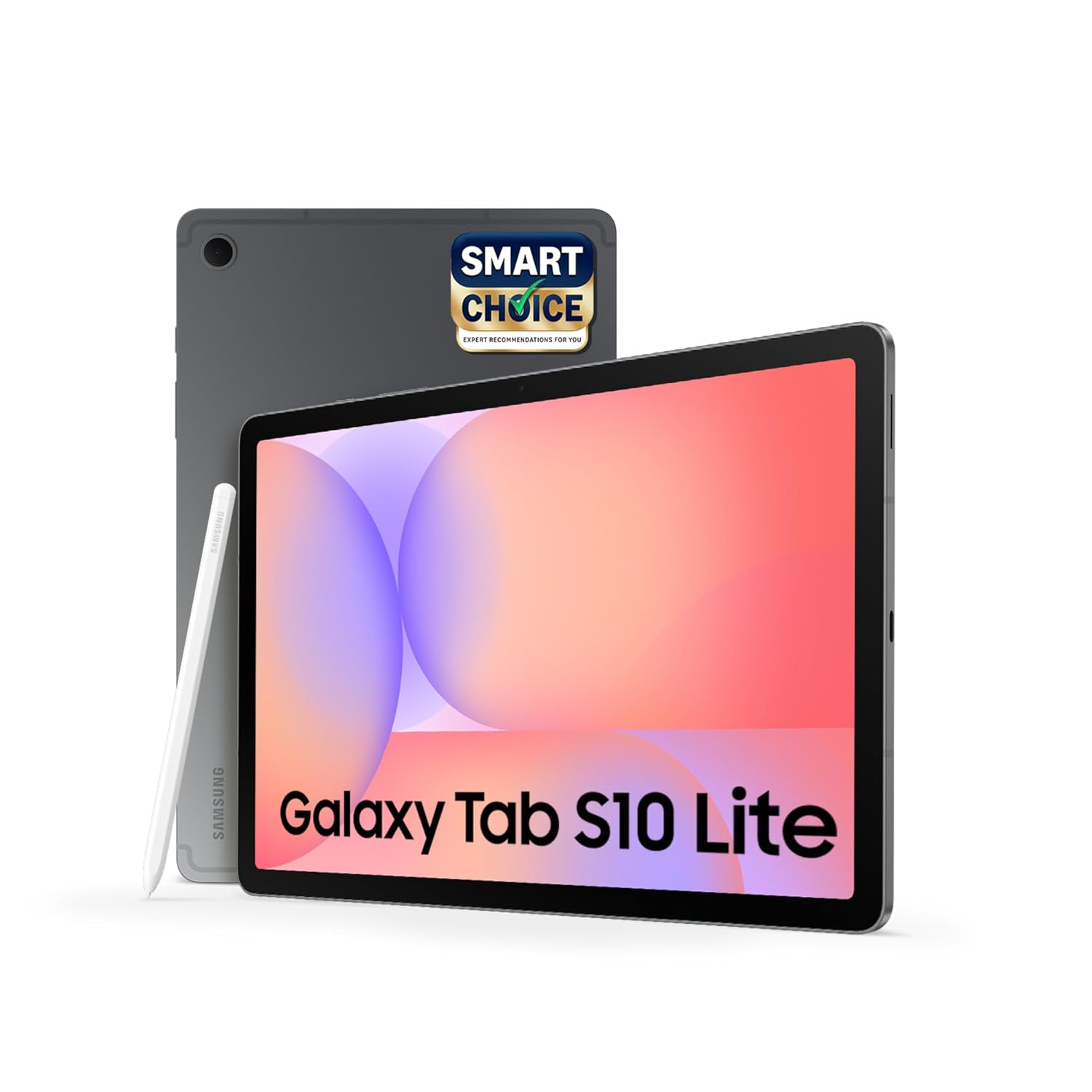

Samsung Galaxy Tab S10 Lite: 10.9-Inch AI-Enabled Tablet with S Pen, 6GB RAM, 128GB Storage, and Dual Speakers
Introduction
The Samsung Galaxy Tab S10 Lite is a versatile Android tablet designed for students, professionals, creative users, and families looking for a convenient device for learning, productivity, and entertainment. Featuring a 10.9-inch LCD display, 6GB RAM, 128GB internal storage, an included S Pen, and AI-enabled features, this tablet combines everyday functionality with creative flexibility.
Finished in an elegant Gray colour, the Galaxy Tab S10 Lite offers a modern appearance suitable for home, school, college, and office environments. Its large display provides ample space for reading, taking notes, watching videos, attending online classes, and working with compatible applications.
The included S Pen is one of its most useful features, allowing users to write, sketch, annotate documents, and interact with supported apps naturally. With Wi-Fi connectivity, dual speakers, expandable storage, and Samsung’s Android-based software experience, the tablet is designed to support a wide range of everyday activities.
1. Stylish Gray Design and Portable Construction
The Samsung Galaxy Tab S10 Lite features a slim design that makes it convenient to carry between home, school, college, and work.
Its Gray finish provides a clean, understated appearance that suits different environments. The lightweight construction is designed to make the tablet practical for everyday use, whether you are reading on the sofa, studying at a desk, or travelling with your device in a backpack.
At approximately 6.6 mm thick and weighing around 524 grams, the tablet offers a balance between a large display and portability.
The simple design also makes it suitable for pairing with compatible tablet covers, stands, and other accessories.
For users who need a device with a larger screen than a smartphone but prefer something easier to carry than a laptop, the Galaxy Tab S10 Lite is a practical option.
2. Large 10.9-Inch LCD Display
The tablet features a 10.9-inch, or 27.7 cm, LCD display with a resolution of 2112 × 1320 pixels.
This screen size provides enough room for reading documents, browsing websites, watching videos, viewing presentations, and using educational applications.
The display’s resolution helps deliver clear text and detailed images for everyday tasks. Its 16:10 aspect ratio is suitable for a mixture of productivity and entertainment, offering a comfortable layout for reading and watching widescreen videos.
The display also supports a refresh rate of up to 90Hz, helping scrolling and compatible animations appear smoother than on a conventional 60Hz screen.
Samsung includes blue-light-reduction technology designed to help make extended viewing more comfortable. However, comfort still depends on brightness, ambient lighting, viewing distance, and how long the device is used.
Whether you are attending online classes, reading electronic books, browsing social media, or watching films, the large screen provides a versatile viewing experience.
3. S Pen Included for Writing, Drawing, and Note-Taking
One of the strongest reasons to consider the Galaxy Tab S10 Lite is its included S Pen.
Instead of relying entirely on finger input, users can write, draw, highlight, and annotate directly on the screen with a compatible stylus experience.
Digital Note-Taking
Students can use the S Pen to write lecture notes, organise study material, solve equations, and highlight important information in compatible applications.
Professionals can use it to annotate documents, record meeting notes, mark up presentations, and capture ideas quickly.
Drawing and Creativity
The S Pen also supports sketching, handwriting, and creative work in compatible applications. It is useful for users who want to experiment with digital drawing without investing in a separate drawing tablet.
More Natural Screen Interaction
Writing with a stylus can feel more natural than typing when capturing short notes, making diagrams, or working through mathematical problems.
The exact tools available depend on the application and software version. Some creative applications may require separate downloads or paid subscriptions.
For students and people who frequently take handwritten notes, the included S Pen adds significant practical value.
4. AI-Enabled Features for Everyday Productivity
The Samsung Galaxy Tab S10 Lite includes supported intelligent features designed to make selected tasks easier.
Its AI-related capabilities can assist with activities such as working with handwritten notes, solving supported mathematical expressions, and using compatible productivity applications.
Solve Math with S Pen
A particularly useful feature for students is the ability to write supported mathematical expressions and have the software calculate answers in compatible situations.
This can help users work through equations and practise mathematical problems without repeatedly switching between different applications.
AI-Assisted Tasks
Depending on software version and feature availability, compatible tools may help users organise information, improve productivity, and work more efficiently with digital content.
These features can be useful for school assignments, personal projects, and everyday organisation.
AI functionality may vary by region, application, language, and software version. Some tools may require additional setup or compatible applications.
The tablet is therefore a useful option for users who want selected AI-assisted capabilities as part of their everyday digital workflow.
5. 6GB RAM for Everyday Multitasking
The Galaxy Tab S10 Lite configuration includes 6GB of RAM, which supports everyday applications and routine multitasking.
Users can browse websites, watch videos, use messaging applications, attend online classes, and work with documents.
The memory configuration is intended for typical daily workloads rather than the most demanding professional computing tasks.
For students, casual users, and people who primarily use a tablet for learning and entertainment, 6GB RAM provides a practical foundation for common applications.
Actual performance depends on the applications being used, the number of tasks running simultaneously, and software optimisation.
6. 128GB Internal Storage with Expandable Capacity
The tablet comes with 128GB of internal storage, providing space for applications, photographs, documents, educational resources, videos, and downloaded media.
This capacity can be suitable for users who primarily stream content, browse the internet, take notes, and store a moderate collection of files.
For students, the storage can accommodate digital textbooks, class notes, assignments, PDFs, and study applications.
The tablet also supports expandable storage through a compatible microSD card, with support advertised for capacities up to 2TB, subject to card compatibility and regional specifications.
Expandable storage is useful for people who want to keep more documents, videos, photographs, and other files available without relying entirely on internal memory.
The operating system and preinstalled applications occupy some of the advertised capacity, so the storage available for personal use will be lower than 128GB.
7. Dual Speakers for Entertainment
The Samsung Galaxy Tab S10 Lite includes a dual-speaker system designed to provide convenient audio for everyday use.
The speakers are suitable for watching online videos, attending video meetings, listening to podcasts, following educational lessons, and enjoying casual entertainment.
Having built-in stereo speakers means users can watch content without necessarily connecting separate audio equipment.
For a more private listening experience, the tablet can also connect to compatible Bluetooth headphones and speakers.
Audio quality depends on the content, volume, application, and listening environment. Users who want deeper bass or a more immersive music experience may prefer compatible external audio accessories.
8. Wi-Fi Connectivity for Learning and Entertainment
This configuration of the Galaxy Tab S10 Lite is a Wi-Fi-only model.
It can connect to compatible wireless networks for browsing the internet, streaming videos, downloading applications, accessing cloud documents, and attending online classes.
Wi-Fi connectivity is especially useful for students and home users who regularly have access to a wireless router.
The tablet also supports Bluetooth for connecting compatible accessories, such as wireless headphones, keyboards, and speakers.
Because this is the Wi-Fi-only configuration, users should not assume it can access mobile data independently through a SIM card. When Wi-Fi is unavailable, a compatible phone hotspot can provide an alternative internet connection.
9. Useful Cameras for Video Calls and Everyday Scanning
The tablet includes an 8MP rear camera and a 5MP front camera.
The rear camera is suitable for everyday photographs, scanning documents, capturing whiteboards, and recording basic videos.
Students can use it to photograph classroom notes, save printed material digitally, and capture reference images for assignments.
The front camera supports video calls, online meetings, virtual classes, and conversations with family and friends.
Although the cameras are useful for everyday tasks, the tablet is primarily designed around its display, S Pen, and productivity features rather than advanced smartphone-style photography.
For best results during video calls, use adequate lighting and position the tablet at a comfortable angle.
10. Battery Capacity for Daily Activities
The Galaxy Tab S10 Lite features an 8000mAh battery designed to support activities such as browsing, reading, streaming, note-taking, and video calls.
Battery performance varies depending on screen brightness, Wi-Fi signal strength, applications, speaker volume, and the amount of time the display remains active.
Users who spend long periods studying, watching lessons, or reading digital documents may find the battery capacity useful for everyday routines.
The tablet supports compatible wired charging, with charging performance depending on the adapter and cable used.
For users who regularly take the tablet to school, college, or work, it is still sensible to charge the device before leaving home and carry a compatible charger when necessary.
11. Android and Samsung Software Experience
The Galaxy Tab S10 Lite runs Samsung’s Android-based One UI software, providing access to compatible applications, personalisation settings, and productivity tools.
Users can customise supported home-screen settings, organise applications, manage notifications, and access Android applications through the available app ecosystem.
The tablet’s larger display can make supported split-screen workflows more convenient, allowing users to reference documents while taking notes or browse information while writing an assignment.
Samsung’s software environment also supports a range of Galaxy accessories and services, depending on device compatibility.
Application availability and features may change with software updates, and some apps require separate subscriptions.
12. Suitable for Students and Online Learning
The Galaxy Tab S10 Lite is particularly well suited to students who want a portable device for digital learning.
Its large display makes it comfortable to read PDFs, view presentations, watch recorded lectures, and browse educational websites.
The S Pen allows students to write notes, mark important passages, draw diagrams, and practise supported mathematical problems.
The 128GB storage capacity can hold a useful collection of digital learning materials, while expandable storage provides additional flexibility.
Wi-Fi connectivity supports online classes, educational videos, and cloud-based study tools.
For students who want to reduce their reliance on printed notes and keep their learning resources organised digitally, this tablet offers a convenient combination of screen space and stylus functionality.
13. Useful for Work and Personal Productivity
The tablet can also support everyday professional and personal tasks.
Users can read and annotate documents, manage email, join online meetings, browse the internet, and work with compatible office applications.
The S Pen is useful for reviewing files, signing supported digital documents, making handwritten notes, and marking up ideas.
A compatible Bluetooth keyboard can make longer typing sessions more convenient, although the keyboard may need to be purchased separately.
For people who do not need the full power or software flexibility of a laptop, the Galaxy Tab S10 Lite can handle many routine tasks in a portable format.
However, users who rely on specialised desktop software, extensive video editing, or complex professional workflows should check application compatibility before replacing a laptop with a tablet.
14. Entertainment and Family Use
The 10.9-inch display and dual speakers make the Galaxy Tab S10 Lite suitable for household entertainment.
Users can watch films, stream television programmes, view online videos, read digital books, and play compatible games.
The larger screen is especially useful for viewing content while travelling or relaxing at home.
Families can also use the tablet for educational applications, drawing activities, reading, and age-appropriate entertainment.
For younger users, parents should configure suitable content restrictions and review application permissions where appropriate.
The combination of a large display, Wi-Fi connectivity, and expandable storage gives the tablet flexibility for a wide range of personal activities.
15. Who Should Consider the Samsung Galaxy Tab S10 Lite?
The Galaxy Tab S10 Lite may be a good choice for:
- Students: The S Pen, large display, and supported mathematical tools are useful for notes, assignments, and digital textbooks.
- Teachers: A stylus can help with lesson preparation, document annotation, and supported educational applications.
- Professionals: The tablet supports email, meetings, document review, and everyday productivity.
- Creative users: The S Pen can be used for sketching, handwriting, and digital artwork in compatible applications.
- Entertainment lovers: The large LCD display and dual speakers support video streaming, reading, and casual gaming.
- Families: The device can support learning, browsing, communication, and shared entertainment.
- Everyday tablet users: The 128GB storage and Wi-Fi connectivity provide a practical setup for routine use.
People who require mobile data without a hotspot, advanced professional graphics performance, or a premium OLED display may want to compare other tablet configurations.
16. Important Things to Know Before Buying
Before choosing the Samsung Galaxy Tab S10 Lite, consider the following points:
- This configuration is Wi-Fi-only and does not provide independent cellular connectivity.
- The LCD display is designed for everyday viewing rather than the deep blacks of an OLED panel.
- The 6GB RAM configuration is intended for regular workloads, not every demanding professional application.
- The S Pen is included, but a keyboard cover and other accessories may be sold separately.
- Expandable storage depends on using a compatible microSD card.
- AI features and supported applications may vary according to software version and region.
- Battery life depends on usage, brightness, connectivity, and application activity.
- Some productivity and creative applications may require separate subscriptions or purchases.
Reviewing these factors can help ensure the tablet matches your everyday requirements.
Conclusion
The Samsung Galaxy Tab S10 Lite is a versatile Android tablet that combines a 10.9-inch LCD display, 6GB RAM, 128GB internal storage, Wi-Fi connectivity, dual speakers, and an included S Pen.
Its large screen provides a comfortable environment for reading, online learning, streaming, and productivity. The S Pen adds practical value for handwritten notes, sketching, document annotation, and supported mathematical tools, while expandable storage gives users additional flexibility.
The Gray finish and slim construction make the device suitable for everyday use at home, in educational settings, or at work. Its AI-enabled capabilities and Samsung software features provide additional convenience for supported tasks.
Overall, the Samsung Galaxy Tab S10 Lite is a practical choice for students, families, and everyday tablet users who want a large display and stylus functionality without necessarily needing a high-end professional tablet. Its combination of portability, useful productivity features, and everyday entertainment capabilities makes it a flexible device for learning and daily life.
Buy This Product From the Official Website Of Amazon.in
Disclaimer
Note: We are just an informational portal. Buy This Product from Amazon.in Official Website. Gadget720 has no control over and makes no warranty or guarantee regarding the quality, usability, safety, morality, or legality of any aspect of the items listed, the truth or accuracy of the listings, or the ability of sellers to sell items or honor their coupon or promotion.
Disclosure: As an Amazon Associate I earn from qualifying purchases.